Release notes

Pelican 5.0

Pelican Navigation, and Scout reports from road authorities

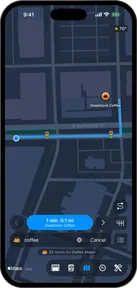
Pelican Navigation

A powerful navigation engine, optimized for Apple Silicon and built on top of OpenStreetMap, meaning it can run entirely on your phone. Now available in public beta.

Learn moreNew

Lane guidance

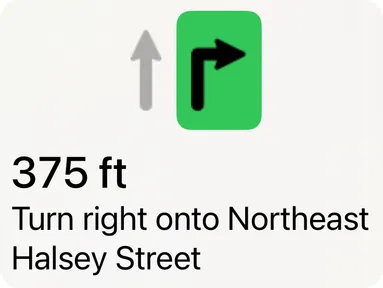
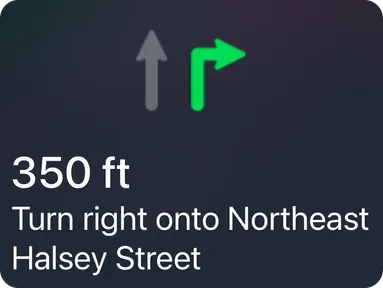
Know which lane to be in before you get there, and prepare for multi-step maneuvers that require being in specific lanes.

Learn moreNew

Offline maps

Download an area to your phone and Pelican can navigate you even while offline. Save multiple offline maps and they automatically update as OpenStreetMap improves.

Learn more
Pelican+
New

Watch your speed

Stay aware of your speed and the road's speed limits, including conditional limits such as school zones. The speed gauge lets you tune how it reacts to your speed.

Learn moreUpdated

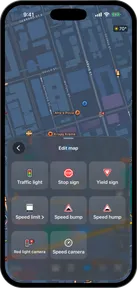
Signs along the route

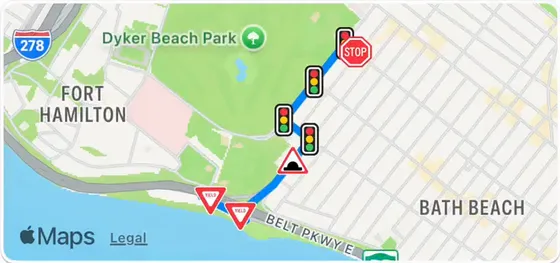
Pelican draws stop signs, traffic lights, yield signs, speed bumps and red light cameras on the route ahead of you.

Learn moreNew

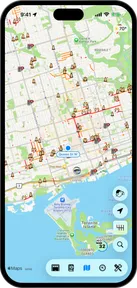
Cameras on the map

See speed cameras, red light cameras, license plate readers, surveillance cameras and other fixtures on the map, both when navigating and cruising.

Learn moreUpdated

Scout reports

Share hazards, closures, accidents, police and more with Scout reports, and see the reports of the drivers ahead of you.

Learn moreUpdated

Leave the map better than you found it

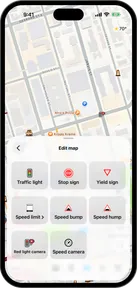
Suggest missing or incorrect speed limits, stop signs, traffic lights and cameras from CarPlay.

Learn moreNew

Voice notes

Keep your hands on the wheel and eyes on the road by using your voice to add context to your Scout reports.

Learn moreNew

Reports from road authorities

See updates from road crews, transportation agencies and weather services alongside reports from fellow drivers.

Learn moreNew

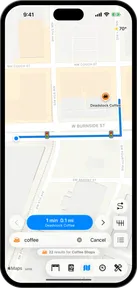
Search

Search built for the driver. Pelican uses your driving history, pinned favorites, and contextual cues to present you the most relevant search results wherever you are.

Learn moreUpdated

012345678900123456789001234567890012345678900123456789001234567890012345678900123456789001234567890miles driven by overkilometers driven by over 100,000 Pelican drivers

Mileage leaderboards

Every mile driven adds to Pelican's global leaderboard, ranked by make and model. Check your ranking and compete with friends on Game Center.

Learn moreUpdated

Default navigation app

New

Settings > Apps > Default Apps > Navigation. From there, system handoffs to maps route through Pelican.

Available in the European Union on iOS 18.4 or later, and Japan on iOS 26.2 or later.

More classic cars supported

J1850 protocol support

Pelican can now talk to more 1996 to 2008-era GM, Ford, and Chrysler cars.

Auto-detect

A new fall-back mode connects to more ISO 9141-2 and ISO 14230 (K-line) cars. It works well for some older models too, like the Peugeot 107.

Map & Navigation settings

Improved

Map preferences are split into separate pages: Navigation, CarPlay, Scout Reports, and Map features, with your Pelican+ benefits (Offline maps, The Danger Zone, and The Fog) grouped together. Map style moves in with the other personalization options. Each row gets its own colored icon so the page is scannable at a glance.

Default map style

Show speed limits

Show range zones

CarPlay options

Scout Report visibility

Map features

Voice guidance

Navigation engine

Navigation

Voice search

CarPlay

Scout reports

Pelican+ benefits

Offline maps

The Danger Zone

The Fog

Share your feedback

New

The new Feedback page, in Settings, lets you share what's working, what isn't, and what you'd like to see, with optional screenshots and an opt-in diagnostic trace. Follow your submissions and get a reply when their status changes.

More languages

Pelican is now available in Arabic, Brazilian Portuguese, Dutch, Greek, Hindi, Japanese, Korean, Romanian, Russian, Simplified Chinese, Swedish, and Urdu.

Bug fixes

  • Fixed pinned quick destinations (Home, Work) not appearing in suggestions when searching from far away.
  • Fixed various crashes while Pelican ran in the background.
  • Fixed Map and widget themes to match your CarPlay Appearance settings.
  • Pelican now reconnects automatically when an OBD scanner drops mid-drive instead of staying disconnected.

Pelican+ benefits

New

Offline maps

Download the areas you drive so navigation keeps working even without a connection.

The Danger Zone

Knowing where you need to stop is key to tackling range anxiety. The Danger Zone shows how far your car can go and warns you as your destination slips toward the edge of your range.

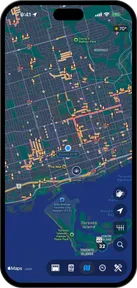
The Fog

See everywhere you've been at a glance. The Fog covers the world in a layer of clouds that gets erased as you drive.

Thank you.

This release was made possible thanks to the incredible feedback from the Pelican beta testing crew, including:

Adelin, Ændrew, Alucanid, blobberbun, boomcan90, BreizhHardware (The frenchy), Emily (British Woman), Grigoris, inFamous, Kylesicle, leorossi05, Liqueseous, M2ABRAMS TANK (The Mayor), Mattingg, MidianBreach, njlarosa, NorthernSystems (British Problem Maker), Olivgrdnbred, Opa Z, RyanB, sidbmw (The OG), TheCamryGuy (OneOfTheOGs), Theslyskyfox, tsprenk, VikingWaarvik, xd-data-ii